The short answer


If that doesn't fit you
- It's a company-wide step challenge with wearables: Stridekick, the organiser pays from $12.99 a month.
- The team lives on Discord: Habit Huddle has a bot and a free tier.
- Everyone runs or rides: a free Strava club.
- It's a one-week experiment: a Slack channel is fine, for a week.
Quick comparison
| App | Teams | Admin dashboard | Auto-tracks | Free tier | Price | Platforms |
|---|---|---|---|---|---|---|
 Daily PactOur pickPrivate groups, organizer or each person pays Daily PactOur pickPrivate groups, organizer or each person pays | From $9.99/mo (organizer) | iOS · Android | ||||
| StridekickStep challenges, organiser pays | From $12.99/mo (organiser) | iOS · Android | ||||
| Habit HuddleHuddles with a group streak | Free / from $8/mo | Web · iOS · Android · Discord | ||||
| Strava clubsGPS activities, club leaderboards | Free | iOS · Android · Web | ||||
| Slack channel or spreadsheetManual | Free | Web |
Competitor prices are US storefront, checked 10 September 2026. Daily Pact prices as of 3 November 2026.
How we chose
We build Daily Pact, so read our pick with that in mind. Every app here was judged on the same questions: who notices when you skip, how fast the check-in is, what happens after a missed day, and what it really costs. We say plainly where another app does something we don't. The full policy is on our About page.

1. Daily Pact
Our pickA team challenge in under a minute, one plan for the whole team
Daily Pact was built for friend groups, and a team is a friend group with a shared calendar. One person creates a private group, invites everyone at once (one link in Slack, a pasted email list or a QR code at the all-hands), and sets the challenge: "walk at lunch", "no meetings before 10", "10,000 steps", "gym twice a week". Everyone checks in with one tap and the leaderboard does the rest. Groups hold up to 1,000 people, so a whole company fits. The organizer can cover the team with one Group plan, or each person uses their own free trial. There's no admin dashboard, no HR integration and no data export, which is a limitation for a company programme and a feature for a team that just wants to do something together.
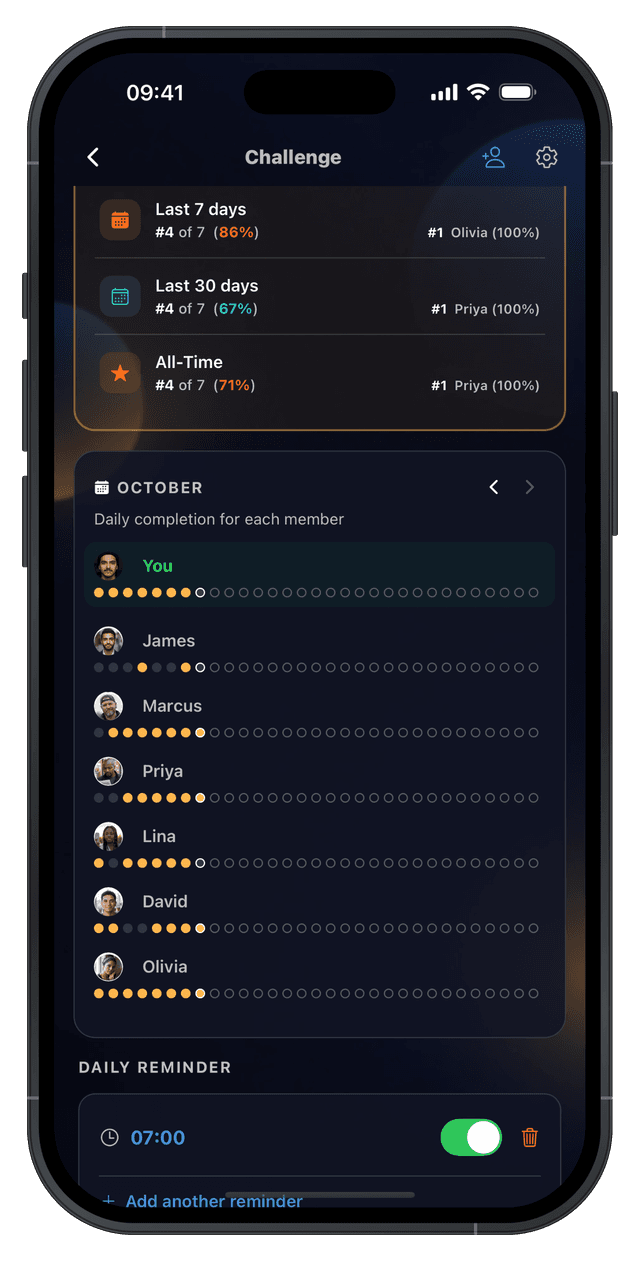


New accounts get 14 days free · No credit card
Pros
- Rated 5.0 on the App Store
- Group plan: one organizer covers 15, 50 or 200 people
- Invite by link, contacts, pasted email list or QR code
- Any habit, daily or weekly
- Leaderboard and notifications
- PactPause for holidays and sick days
- No health or location data collected
Cons
- No admin dashboard or export
- No free trial on the Group plan
- Group plan is paid by card on the web or in the app, not by invoice
2. Stridekick
Step challenges built for organisations
Stridekick is the closest thing here to a corporate wellness tool. It syncs steps from Fitbit, Apple Watch, Garmin, Withings, WHOOP, Oura and phones, and runs leaderboards, targets, virtual races and streaks. Only the organiser pays: Pro 10 is $12.99 a month, Pro 20 $24.99, Pro 50 $49.99, and an Unlimited plan with team modes, a dashboard and an account manager is priced on request. The free tier is public challenges of up to 10 people for 7 days.
Pros
- Every wearable supported
- Organiser pays, not each employee
- Team modes and a dashboard on Unlimited
Cons
- Steps only
- Pro from $12.99/mo; Unlimited is custom pricing
- Free tier is public and 7 days
3. Habit Huddle
Huddles, seasons, and a Discord bot
Habit Huddle's private huddles give a team a shared group streak, individual streaks, monthly seasons with leaderboards and a web app, plus a Discord bot for teams that live there. Free tier; paid from $8 a month per person. More to set up than Daily Pact, more flexible than a step-only tool.
Pros
- Free tier
- Web app and Discord
- Seasons keep it fresh month to month
Cons
- Paid tiers from $8/mo per person
- Feature-heavy
- Small community
4. Strava clubs
For teams that run and ride
A Strava club is free, most active people already have the app, and the club leaderboard counts distance and time automatically. It's the right tool for a running or cycling team and the wrong one for anything that isn't a GPS activity. The $11.99 a month subscription is for individual analysis, not clubs.
Pros
- Free
- Automatic tracking
- Everyone's on it
Cons
- GPS activities only
- Easy to ignore
- No habit challenges
5. Slack channel or spreadsheet
The DIY route
A #challenge channel or a shared sheet costs nothing and needs no sign-up. Every team tries it, and it lasts about two weeks: nobody wants to be the one posting a nag, the sheet falls to one person, and it quietly stops. It's fine for a one-off week. For a month, use something that sends the reminder for you.
Pros
- Free
- No new tool
- Instant
Cons
- No reminders
- Someone has to maintain it
- Dies around week two
Best app for a workplace wellness challenge
The best app for a workplace wellness challenge is the one your whole team joins in the first week. For a team of 5 to 200 that wants one habit for a month (walk at lunch, water, log off by 6pm), Daily Pact: one invite link, a one-tap check-in, a shared leaderboard and no health data. For a company-wide step challenge with wearables and an admin dashboard, Stridekick.
| Your challenge | Best fit | Why |
|---|---|---|
| Any wellness habit for a month (walks, water, sleep, screen-free lunch) | Daily Pact | Any habit as a yes/no check-in, leaderboard, one organizer can pay for the team |
| Steps across the whole company, synced from watches | Stridekick | Reads steps from wearables, organiser pays, dashboard on Unlimited |
| Running or cycling distance | Strava club | Free, tracks GPS activities automatically |
| A remote team that lives on Discord | Habit Huddle | Discord bot, monthly seasons, free tier |
| One week, no new tool | Slack channel | Free and instant, but nobody sends the reminder |
Three things decide whether a wellness challenge works at work. It is opt-in (an invite, not an enrollment), it asks for a yes or no instead of health data, and it has an end date, usually 30 days. A check-in app meets all three by design; a step-sync tool needs people to agree to share their step data.
For 25 ideas to pick from (movement, sleep and more), see our employee wellness challenge ideas, or start from a ready-made wellness challenge. How one lead covers the whole team: Daily Pact for workplaces.
12 workplace challenge ideas that work as check-ins
Each is a yes/no. Weekly targets are marked; they suit work better than daily streaks because of meetings, travel and Fridays.
- Walk at lunch, 20 minutes
- 10,000 steps a day
- No meetings before 10am (weekly: 4 days)
- Inbox to zero by end of day
- Stand-up desk for 2 hours
- Gym or run 3 times a week (weekly)
- Drink 2 litres of water
- Screen-free lunch
- One learning session a week: a course, a talk, a book chapter (weekly)
- Log off by 6pm
- Take the stairs all day
- Cook lunch instead of buying it, 3 days (weekly)
For month-by-month themes see monthly challenge ideas, which has a section for work.
The privacy checklist before you start
A team challenge is voluntary or it's a problem. Four checks, in order:
- Opt in, never opt out. Send an invite people can accept; don't add them yourself.
- No health data unless people choose to share it. A tap that says "I walked" is not health data. A synced heart rate is. Daily Pact collects neither steps nor location; step-sync tools do.
- Managers see what everyone sees. A leaderboard is fine when it's the same for everyone. A dashboard only the manager can see changes the dynamic.
- Make it end. A 30-day challenge with a finish line is a team activity. An open-ended one becomes monitoring.
What it costs for a team of 10, 20 or 50
| App | 10 people, 1 month | 20 people | 50 people | Who pays |
|---|---|---|---|---|
| Daily Pact Group plan | $9.99 | $24.99 | $24.99 | Organizer |
| Daily Pact, each person | $9.90 (after 14 days free) | $19.80 | $49.50 | Each person, $0.99/mo |
| Stridekick Pro | $12.99 | $24.99 | $49.99 | Organiser |
| Habit Huddle | Free tier, or from $80 on Builder | from $160 | from $400 | Each person |
| Strava clubs | Free | Free | Free | Nobody |
| Slack / sheet | Free | Free | Free | Nobody |
The Daily Pact Group plan covers 15 people for $9.99/mo and up to 50 for $24.99/mo, so a 20-person team is on the 50 tier. Yearly is two months free ($249.99 for 50). Per-seat wellness tools typically charge $3 to $8 per employee per month.
For a one-month challenge the difference is small. The real cost is the organiser's time, which is why the tool that needs least setup usually wins.
Running it for the whole team?
Two things decide whether a team challenge starts at all: how fast everyone gets in, and who pays. In Daily Pact, both are one step for the organizer.
- Invite everyone at once. Share one link in Slack or Teams, paste the team's email list (up to 200 at a time, and you see who opened and who joined), or show a QR code at the all-hands.
- One person covers the team. The Group plan is $9.99/mo for up to 15 people, $24.99/mo for 50 and $49.99/mo for 200. Members never see a paywall, and the organizer gets full Pro too.
- Or everyone pays for themselves. Each person gets a 14-day free trial, then $0.99/mo.
The Group plan is bought on the web at /groups or in the app. See how Daily Pact works for teams and groups.
Running it so it lasts the month
- One challenge, one habit. Not five. Add a second in month two.
- Announce a start and an end date. Monday to the last Friday of the month.
- Decide what a missed day means before day one. In Daily Pact, a PactPause the group approves; in Stridekick, nothing: steps are steps.
- Post the leaderboard weekly, in the channel, from the app. The reminder should come from the tool, not from you.
- Small prize, big ceremony. A coffee voucher presented at the all-hands beats a cash prize nobody mentions.
Frequently Asked Questions
What is the best app for a workplace wellness challenge?
For most teams, Daily Pact: the organizer invites everyone with one link or a pasted email list, each person checks in with one tap, the leaderboard keeps it going, and no health or location data is collected. One Group plan covers the team (from $9.99 a month for 15 people). For a company-wide step challenge that syncs wearables and needs a dashboard, Stridekick.
What is the best team accountability app?
For a team that wants a habit or wellness challenge without an HR platform, Daily Pact: invite everyone at once, one-tap check-ins, a leaderboard, no health data collected, and one Group plan the organizer pays (from $9.99/mo for 15 people, $24.99/mo for 50). For company-wide step challenges with wearables and a dashboard, Stridekick. For a running team, a free Strava club.
Is there a free team challenge app?
Strava clubs are free. Habit Huddle has a free tier. Stridekick is free for public 7-day challenges of up to 10 people. Daily Pact is free for 14 days for everyone, then $0.99 a month each, or one organizer covers the team with a Group plan from $9.99 a month.
Can we run a step challenge at work without wearables?
Yes, as a check-in: everyone sets the same daily target and taps when they've hit it, using whatever counts their steps. That's how Daily Pact works, and it means people with different phones and watches can be on one leaderboard. If you want the app to read the steps itself, use Stridekick.
Is a workplace challenge a privacy issue?
It can be, if it's mandatory, collects health data by default, or gives managers a view nobody else has. Keep it opt-in with an invite link or code, use a yes/no check-in rather than synced health data unless people choose otherwise, and give it an end date.
How big should a team challenge group be?
Between five and twenty works best: enough that one person going quiet doesn't end it, few enough that everyone's name is visible on the leaderboard. Above twenty, split into squads and compare squad averages.
Related guides
Start a team challenge, free for 14 days
Start your 14-day free trial. No credit card required.
5.0 from 13 App Store ratingsAvailable on iPhone & Android · 14 days free for new accounts