Group plan
One small daily habit. Your whole group, together.
For teams, classes, clubs and families. One person covers the group, everyone else joins free. No paywall for anyone you invite, so nobody drops off at the door.
See group plansAlready have a group? Invite your members by email
Made for people who run groups
Teams and workplaces
A wellness challenge for your team or the whole office, on one bill instead of per-seat pricing.
Coaches
Give every client the same daily check-in without asking them to buy an app.
Teachers and classes
A reading or study habit for the whole class. Show the QR code on the board and everyone joins.
Fitness and nutrition challenges
Run a 30-day challenge for your gym or followers and let everyone in for free.
Families
One parent covers everyone, from screen-time limits to a daily walk together.
Clubs and friend groups
Run clubs, book clubs and group chats where one person is happy to pay for everyone.
Pick how many people to cover
You're covered too, with full Pro. A 50-person team is $24.99/month, compared with $49.50 if everyone paid for Pro monthly, or $3 to $8 per employee per month on per-seat wellness tools.
15 people
A coaching group, class or team
- Up to 15 members covered, free for them
- Full Pro for you too
- Works across all the groups you run
50 people
A workplace or fitness challenge
- Up to 50 members covered, free for them
- Full Pro for you too
- Works across all the groups you run
200 people
A wellness program or community
- Up to 200 members covered, free for them
- Full Pro for you too
- Works across all the groups you run
Prices in USD. No free trial on group plans. Cancel anytime, coverage runs to the end of the period.
Billed through the App Store on iPhone or Google Play on Android.
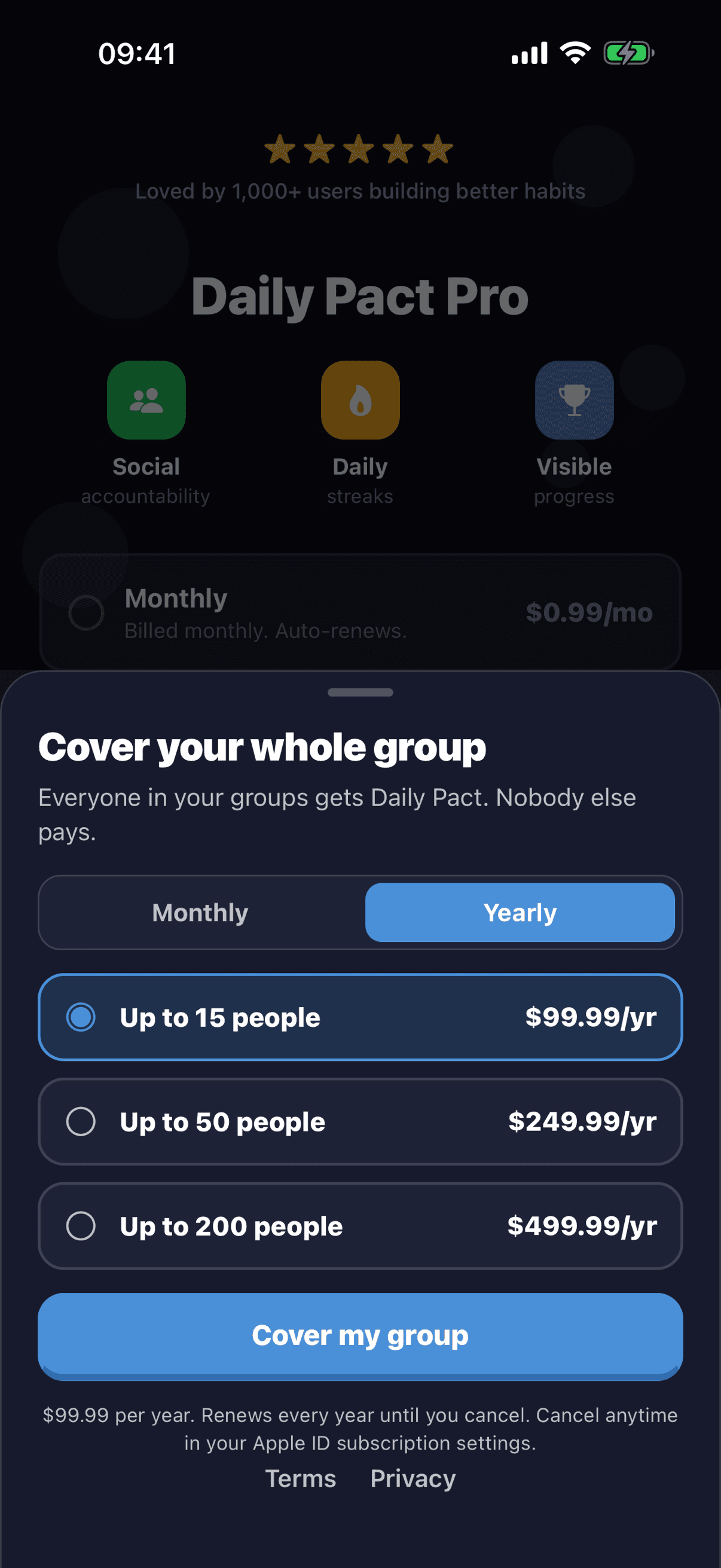
Or buy it in the app
Open your group and tap Cover your whole group. Pick a size and monthly or yearly (yearly is 2 months free). On iPhone it's billed through the App Store, on Android through Google Play.
Group plans have no free trial. Cancel anytime and coverage runs to the end of the period. Members see "Alex covers this group" (with your name) and never hit a paywall while they're covered.
Invite everyone at once, four ways
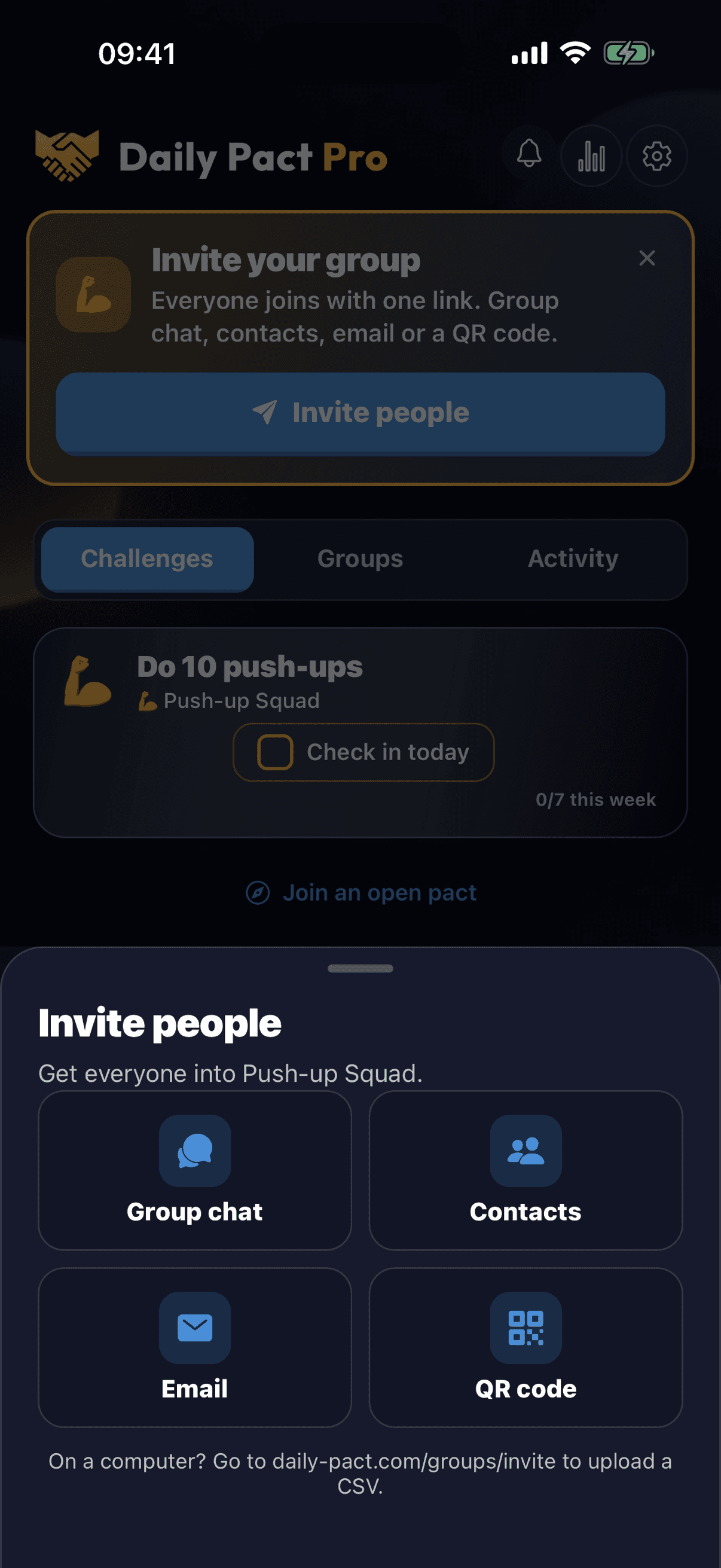
Tap Invite people in your group and pick what fits. Anyone can unsubscribe from invite emails with one click.
Group chat
Share one link in WhatsApp, Slack, Messenger or iMessage. One tap opens the group.
Contacts
Pick several people at once. People with an email get a personal invite from Daily Pact, the rest get one text from your phone.
Email
Paste a list straight from a spreadsheet or email thread, up to 200 at a time. See who opened and who joined, and resend if needed.
QR code
Show it at a class, a meeting or the gym. People scan it with their camera and they're in.
On a computer? Invite your members by email: sign in, pick your group, paste emails or upload a CSV, and track who joined.
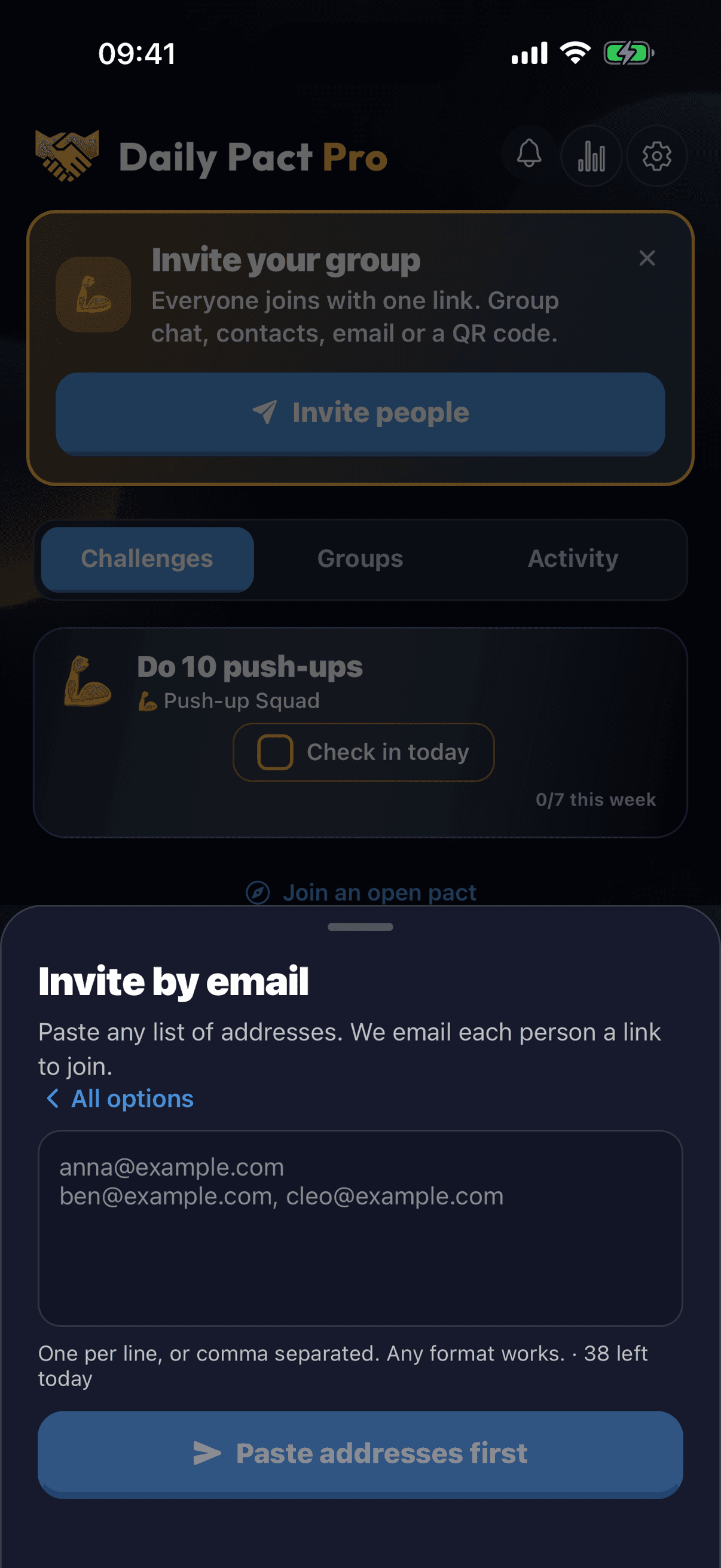
See who joined
Paste a list of up to 200 addresses, one per line or comma separated, straight from a spreadsheet or an email thread. Daily Pact emails each person a personal invite. One tap opens the group, and you can see who opened it, who joined and resend to the rest.
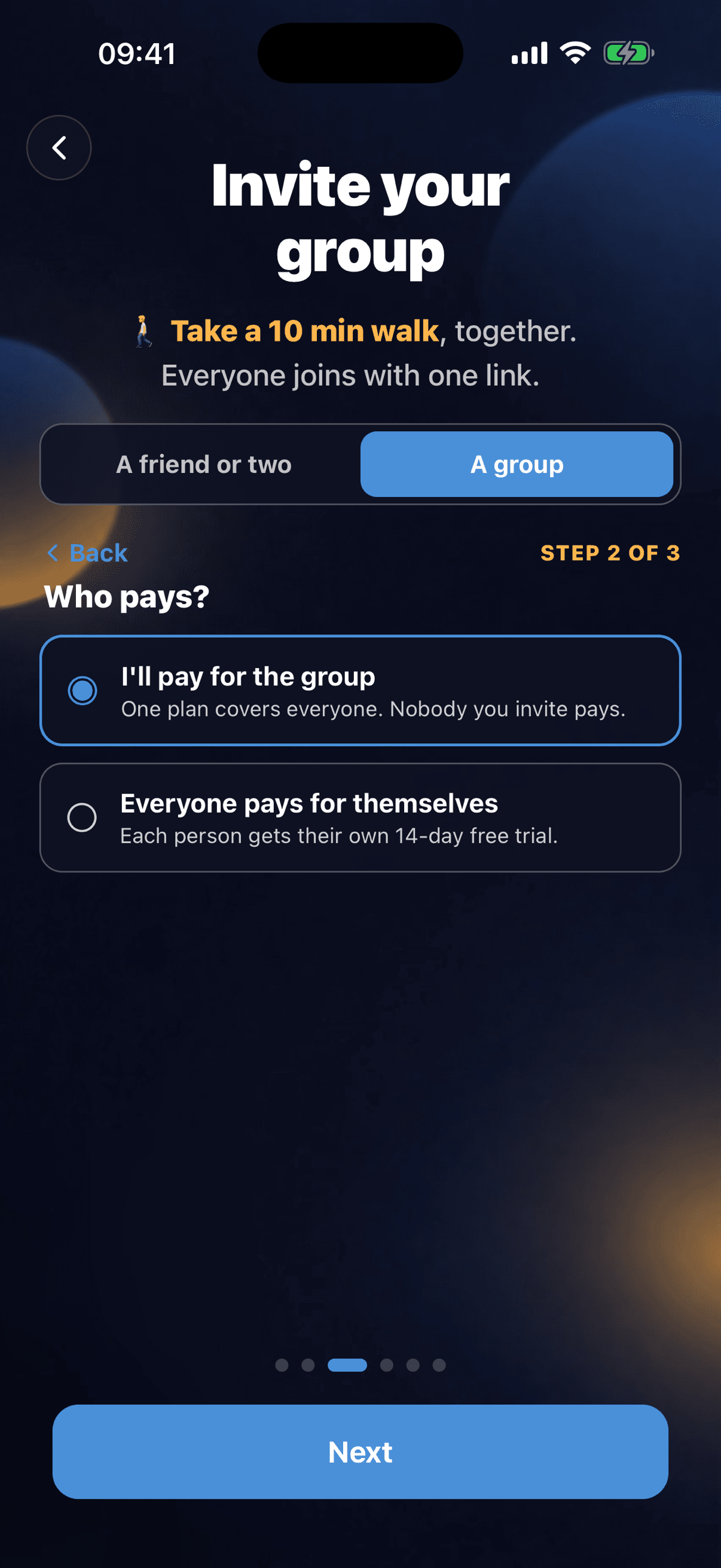
New to Daily Pact? Start as a group
When the app asks Who's doing this with you?, choose A group. Then:
- 1. Name your group. Your team, class or club.
- 2. Who pays? Choose I'll pay for the group to cover everyone, or Everyone pays for themselves and each person gets their own 14-day free trial.
- 3. Invite. Group chat link, contacts, email or QR code.
How it works
- Step 1
Start your group in the app
Create a group in Daily Pact and pick the daily habit you'll do together.
- Step 2
Tap Cover your whole group
Choose 15, 50 or 200 people, monthly or yearly, right here on the website or in the app.
- Step 3
Invite everyone, they join free
Send one link, pick contacts, paste emails or show a QR code. Members are covered the moment they join and never see a paywall.
Group plan questions
How do I buy a Group plan?
Two ways. On this page: pick a size above, sign in and pay by card. Or in the app: open your group and tap Cover your whole group, or during sign-up choose A group, then I'll pay for the group. In the app it's billed through the App Store or Google Play.
Do my members need to pay?
No. Anyone who joins one of your groups is covered by your plan, up to the number of people it includes. Covered members see your name on the group and never hit a paywall.
How do I invite 50 people at once?
Open your group and tap Invite people. Paste all 50 email addresses (one per line or comma separated, straight from a spreadsheet) and Daily Pact emails each person a personal invite, up to 200 at a time. You can also pick several contacts at once, share one link in your group chat, or show a QR code. On a computer, use daily-pact.com/groups/invite to paste emails or upload a CSV.
Is there a free trial on group plans?
No. Group plans have no free trial. The organizer pays, and members you invite are covered from the moment they join, so they never need a trial. You can cancel anytime.
What happens if more people join than my plan covers?
The first people to join are covered, up to your plan's limit. Anyone after that uses Daily Pact on the normal terms, with their own 14-day free trial or Pro. You can upgrade to a bigger plan anytime.
Can everyone pay for themselves instead?
Yes. At sign-up, choose Everyone pays for themselves. Each person gets their own 14-day free trial, then Pro is $0.99/month, $9.99/year or $39.99 once. You can switch to covering the group later.
How big can a group be?
Groups can have up to 1,000 people. One Group plan covers up to 200 of them, counted by join date across all the groups you run.
Which groups does the plan cover?
Every group you own in Daily Pact, except open pacts. Coverage counts people, not groups, so a member who is in two of your groups takes one spot. You get full Pro too.
Can I cancel?
Yes, anytime. Bought on the website: use the link in your receipt email. Bought in the app: your App Store or Google Play subscription settings. Your members stay covered until the end of the period you paid for.
Do members who already pay keep paying?
Their own subscription stays active until they cancel it in their App Store or Google Play settings. We can't cancel it for them, so let them know they can.
Paying just for yourself? See personal plans. Curious how groups work? Read about groups in Daily Pact, or see how we compare in the best accountability apps.

Start your group in Daily Pact
Create the group in the app, then open it and tap Cover your whole group.
5.0 from 12 App Store ratingsAvailable on iPhone & Android · 14 days free for new accounts